


Poor data quality causes 35% of ERP implementation failures.
Companies migrate 10 years of dirty data. Duplicate customers. Incorrect inventory counts. Mismatched GL accounts. The new ERP inherits every problem from the old system.
Then they skip proper testing. “We’ll test in production.” Day 1 go-live: system crashes, orders can’t ship, finance can’t close books.
We’ve migrated data for automotive e-commerce clients with 100K+ SKUs, 50K+ customers, and 15 years of transaction history. Here’s how to do it without breaking your business.
Why Data Migration Is the #1 Risk
The Statistics:
- 35% of ERP failures caused by poor data quality
- 60% of companies underestimate data cleanup effort
- Average data cleanup time: 3-4 months (most plan 2-4 weeks)
- Cost of bad data: $15M/year for average company (Gartner)
What Goes Wrong:
Before migration:
- “Our data is fine” (it never is)
- “We’ll clean it after migration” (too late)
- “We need all 15 years of history” (you don’t)
After migration:
- Duplicate customer records (can’t invoice)
- Incorrect inventory counts (can’t fulfill orders)
- Mismatched GL accounts (can’t close books)
- Missing required fields (transactions fail)
Result: Weeks of manual cleanup, delayed go-live, budget overruns.
PHASE 3: Data Migration (Weeks 13-18)

✅ Data Assessment & Cleanup
Why this matters: Garbage in = garbage out. Clean data before migration, not after.
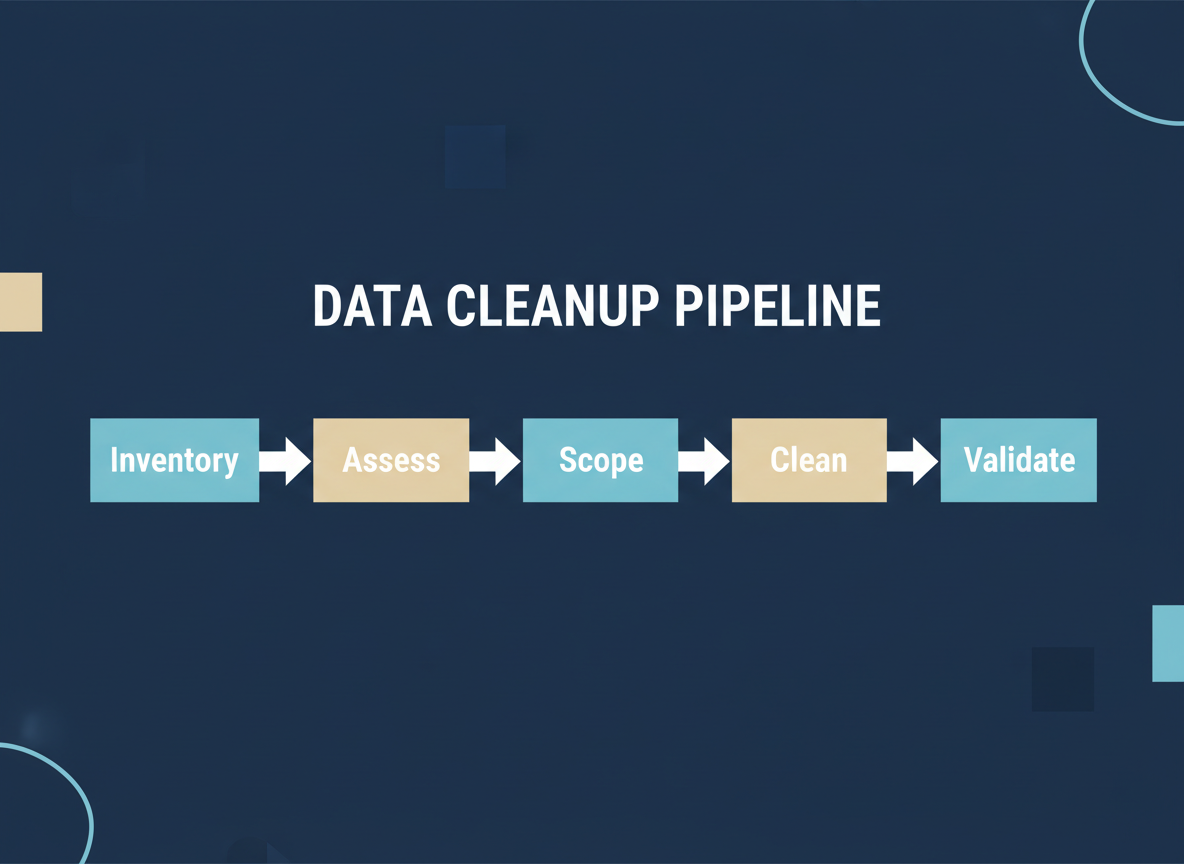
Step 1: Inventory Data Sources
-
Primary system (legacy ERP/accounting)
- Customer master
- Vendor master
- Item master
- Chart of accounts
- Open transactions (AR, AP, POs, SOs)
- Transaction history
-
Secondary systems
- E-commerce platform (Shopify, Magento)
- CRM (Salesforce, HubSpot)
- Shipping system (ShipStation)
- Spreadsheets (pricing, inventory adjustments)
- Access databases (custom reports)
-
Identify “source of truth” for each data type
- Customers: CRM or ERP?
- Items: E-commerce or ERP?
- Inventory: WMS or ERP?
Step 2: Assess Data Quality
Run these reports in your legacy system:
-
Duplicate records
- Customers with same name/address
- Vendors with same tax ID
- Items with same description
-
Missing required fields
- Customers without billing address
- Items without cost or price
- Vendors without payment terms
-
Inconsistent formats
- Addresses: “St” vs. “Street” vs. “ST”
- Phone: (555) 123-4567 vs. 555-123-4567 vs. 5551234567
- Dates: MM/DD/YYYY vs. DD/MM/YYYY
-
Inactive/obsolete records
- Customers with no orders in 3+ years
- Items not sold in 2+ years
- Vendors not used in 1+ year
Real example: Automotive client: 50K customer records. Analysis revealed:
- 8K duplicates (same company, different spellings)
- 12K inactive (no orders in 5+ years)
- 5K missing required fields (tax ID, payment terms)
- Actual clean records: 25K (50% reduction)
Step 3: Define Migration Scope
- What data to migrate:
Always migrate:
- Active customers (ordered in last 2 years)
- Active vendors (used in last 1 year)
- Active items (sold in last 1 year)
- Chart of accounts
- Open transactions (AR, AP, POs, SOs)
Consider migrating:
- 1-3 years transaction history (for reporting)
- Inactive customers (if might reactivate)
- Inactive items (if might restock)
Don’t migrate:
-
10+ years of history (archive instead)
-
Duplicate records
-
Test/demo data
-
Obsolete items (discontinued, never coming back)
-
How much history:
Financial data:
- Open transactions: Yes (AR, AP, POs, SOs)
- Closed transactions: 1-2 years (for reporting)
- Historical GL: 7 years (for tax compliance, but can archive)
Operational data:
- Sales orders: 1 year (for customer history)
- Purchase orders: 1 year (for vendor history)
- Inventory transactions: 1 year (for costing)
Rule: Migrate what you need for operations. Archive the rest.
Step 4: Clean Data
Allocate 6-8 weeks for this. It always takes longer than expected.
-
Merge duplicates
- Customers: Merge “ABC Company” and “ABC Co” and “ABC Company Inc”
- Vendors: Merge based on tax ID
- Items: Merge based on manufacturer part number
-
Standardize formats
- Addresses: Use USPS format
- Phone: (555) 123-4567 format
- Dates: YYYY-MM-DD format
-
Fill missing fields
- Customer payment terms: Default to “Net 30”
- Item cost: Use last purchase price
- Vendor 1099: Yes/No (required for tax)
-
Remove obsolete records
- Archive (don’t delete) inactive customers/vendors/items
- Keep in legacy system for reference
- Don’t migrate to new ERP
-
Validate critical data
- Inventory counts: Physical count before migration
- AR/AP balances: Reconcile to GL
- Item costs: Verify against recent POs
Tools for data cleanup:
- Excel (for small datasets, <10K records)
- SQL queries (for large datasets)
- Data cleaning tools (Trifacta, Talend, Informatica)
- Implementation partner’s data migration tool
Real example: Client tried to migrate without cleanup. Day 1 post-go-live:
- 200 orders failed (duplicate customer records)
- 50 items couldn’t ship (missing cost)
- Finance couldn’t close month (AR/AP didn’t balance)
Spent 3 weeks fixing. Should have cleaned before migration.
Step 5: Map Old Data to New Structure
- Chart of accounts mapping
Copy table
-
Customer/vendor mapping
- Old ID → New ID (if changing ID structure)
- Old payment terms → New payment terms
- Old tax codes → New tax codes
-
Item mapping
- Old item code → New item code
- Old item type → New item type (inventory, non-inventory, service)
- Old costing method → New costing method (FIFO, average, standard)
Create mapping spreadsheet. This is your migration blueprint.
✅ Data Migration Execution
Why this matters: Test migrations catch 90% of issues. Skip testing = disaster on go-live.
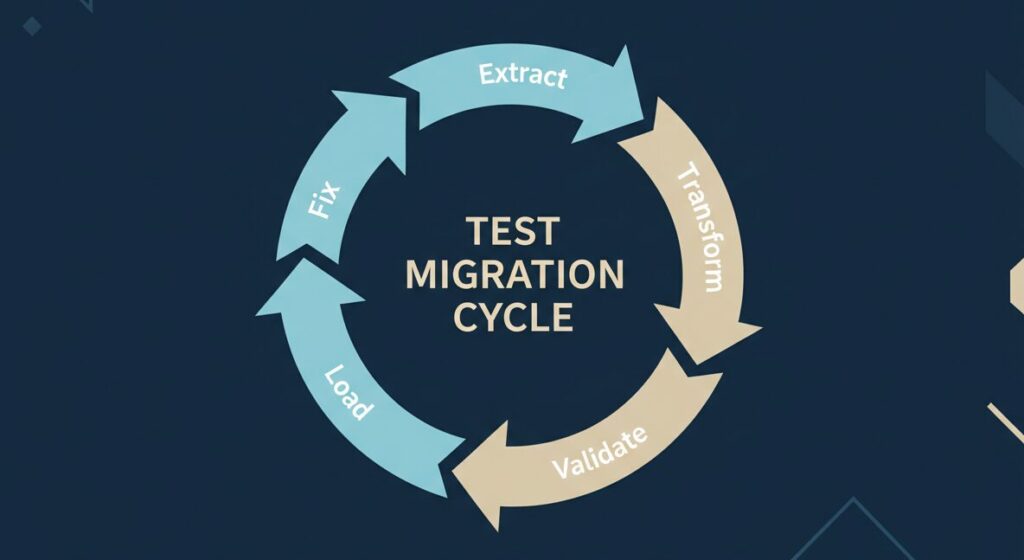
Step 1: Extract Data from Legacy System
-
Export to CSV/Excel
- Customers: All fields (name, address, payment terms, etc.)
- Vendors: All fields
- Items: All fields (description, cost, price, quantity, etc.)
- Open transactions: AR, AP, POs, SOs
- GL balances: Opening balances for new system
-
Validate export completeness
- Record counts: 25,000 customers exported, 25,000 expected ✓
- Financial totals: AR = $500K, AP = $300K, Inventory = $1.2M
- Spot-check: Review 50 random records manually
Step 2: Transform Data
-
Apply mapping rules
- Old account 4000 → New account 4100
- Old payment terms “30 days” → New payment terms “Net 30”
-
Format correctly
- Dates: Convert to YYYY-MM-DD
- Numbers: Remove commas, currency symbols
- Text: Handle special characters (é, ñ, ü)
-
Validate required fields
- Every customer has billing address ✓
- Every item has cost and price ✓
- Every transaction has date and amount ✓
Step 3: Load Data into ERP (TEST ENVIRONMENT FIRST!)
CRITICAL: Never migrate directly to production. Always test first.
- Test Migration #1 (Week 14)
Load order matters:
- Chart of accounts
- Customers
- Vendors
- Items
- Opening balances (AR, AP, Inventory)
- Open transactions (POs, SOs)
Import using:
-
ERP’s import tool (CSV import)
-
API (for large datasets)
-
Implementation partner’s migration tool
-
Validate Test Migration #1
Record counts:
- Customers: 25,000 exported, 24,800 imported → 200 failed, investigate
- Vendors: 5,000 exported, 5,000 imported → ✓
- Items: 100,000 exported, 99,500 imported → 500 failed, investigate
Financial totals:
- AR: $500K expected, $498K imported → $2K difference, investigate
- AP: $300K expected, $300K imported → ✓
- Inventory: $1.2M expected, $1.15M imported → $50K difference, investigate
Spot-check 100 records:
- Customer “ABC Company”: Address correct? Payment terms correct? ✓
- Item “12345”: Description correct? Cost correct? Quantity correct? ✓
Identify issues:
-
200 customers failed: Missing required field (tax ID)
-
500 items failed: Invalid item type
-
$2K AR difference: Rounding errors
-
$50K inventory difference: Costing method mismatch
-
Fix issues, refine process
- Add missing tax IDs
- Correct item types
- Adjust rounding rules
- Recalculate inventory costs
-
Test Migration #2 (Week 16)
Load data again (fresh test environment):
- Apply fixes from Test Migration #1
- Validate again (record counts, financial totals, spot-checks)
- Goal: 100% success rate, zero discrepancies
If Test Migration #2 successful:
- Document final migration process (step-by-step)
- Lock down mapping (no more changes)
- Schedule final migration (go-live weekend)

If Test Migration #2 has issues:
- Fix issues
- Run Test Migration #3
- Don’t proceed to go-live until test migration is perfect
Real example: Client ran 4 test migrations. Each revealed new issues:
- Test 1: 15% failure rate
- Test 2: 5% failure rate
- Test 3: 1% failure rate
- Test 4: 0% failure rate ✓
Final migration (go-live weekend): 0% failure rate. Smooth.
Step 4: Plan Final Migration
-
Timing: Weekend or holiday
- Friday 5 PM: Freeze legacy system (no new transactions)
- Friday 6 PM – Saturday 12 PM: Data migration (6 hours)
- Saturday 12 PM – 6 PM: Validation (6 hours)
- Saturday 6 PM – Sunday 12 PM: User acceptance validation (18 hours)
- Sunday 12 PM – 6 PM: Final checks, issue resolution (6 hours)
- Sunday 6 PM: Go/no-go decision
-
Data migration lead (runs migration scripts)
-
Finance (validates AR, AP, GL balances)
-
Operations (validates inventory, open orders)
-
IT (technical support, troubleshooting)
-
Implementation partner (on-call support)
-
Communication plan:
- Friday 4 PM: Email all users “System freeze at 5 PM, no new transactions”
- Saturday 12 PM: Email steering committee “Migration complete, validation in progress”
- Sunday 6 PM: Email all users “Go-live Monday 8 AM” or “Delayed, will notify”
-
Rollback plan:
- If migration fails (data doesn’t balance, critical errors)
- Revert to legacy system Monday morning
- Communicate delay to customers/vendors
- Reschedule go-live (2-4 weeks)
Red flags:
- “We’ll migrate once, on go-live weekend” → No testing = disaster
- Financial totals don’t match after test migration → Don’t proceed
- “We’ll fix discrepancies after go-live” → Too late, will cause chaos
PHASE 4: Testing (Weeks 17-22)
✅ Unit Testing
Why this matters: Test each function individually before testing end-to-end workflows.
Checklist:
- Basic transactions (Week 17-18)
Sales Order:
- Create sales order → Add items → Calculate tax → Calculate shipping → Save
- Expected: Order total = $100 + $8 tax + $10 shipping = $118 ✓
Purchase Order:
- Create PO → Add items → Set vendor → Save
- Expected: PO created, vendor notified ✓
Inventory Receipt:
- Receive PO → Scan items → Update quantity → Post
- Expected: Inventory increased, PO marked received ✓
Fulfillment:
- Pick items → Pack → Generate shipping label → Ship
- Expected: Inventory decreased, order marked shipped ✓
Invoice:
- Create invoice from sales order → Calculate totals → Post
- Expected: AR increased, revenue recognized ✓
Payment:
-
Receive payment → Apply to invoice → Post
-
Expected: AR decreased, cash increased ✓
-
Calculations (Week 18)
Tax calculations:
- Order to California: 9.5% tax ✓
- Order to Oregon: 0% tax (no sales tax) ✓
- Tax-exempt customer: 0% tax ✓
Discounts:
- 10% discount on $100 order = $90 ✓
- Volume discount: 100+ units = 15% off ✓
Shipping costs:
- Ground shipping: $10 ✓
- Expedited: $25 ✓
- Free shipping over $100 ✓
Inventory costing:
-
FIFO: First in, first out ✓
-
Average cost: Recalculates on each receipt ✓
-
Workflows (Week 18-19)
PO approval:
- PO under $5K: Auto-approved ✓
- PO $5K-$25K: Manager approval required ✓
- PO over $25K: Director approval required ✓
- Email notifications sent ✓
Expense approval:
-
Expense under $500: Auto-approved ✓
-
Expense over $500: Manager approval ✓
-
Integrations (Week 19)
E-commerce → ERP:
- Order placed on Shopify → Flows to NetSuite within 5 minutes ✓
- Customer data syncs ✓
- Inventory syncs ✓
ERP → Shipping:
- Order ready to ship → Generate FedEx label ✓
- Tracking number updates order ✓
- Customer receives tracking email ✓
Payment processing:
-
Credit card payment → Authorizes in Stripe ✓
-
Payment posts to NetSuite AR ✓
-
Reports (Week 19-20)
Financial statements:
- Profit & Loss: Revenue, COGS, expenses ✓
- Balance Sheet: Assets, liabilities, equity ✓
- Cash Flow: Operating, investing, financing ✓
Operational reports:
- Inventory by location ✓
- Sales by customer ✓
- Purchasing by vendor ✓
- Open orders ✓
Custom reports:
- Daily sales dashboard ✓
- Inventory reorder report ✓
- Vendor performance scorecard ✓
Document all test results:
- Pass/fail for each test
- Screenshots of successful transactions
- Log of any issues found
Red flags:
- Skipping unit testing, jumping to UAT → Will find issues too late
- “It mostly works” → Not good enough, must be 100%
- Not documenting test results → Can’t prove readiness
✅ User Acceptance Testing (UAT)
Why this matters: Real users testing real scenarios. Last chance to catch issues before go-live.
Step 1: Create Test Scenarios (Week 20)
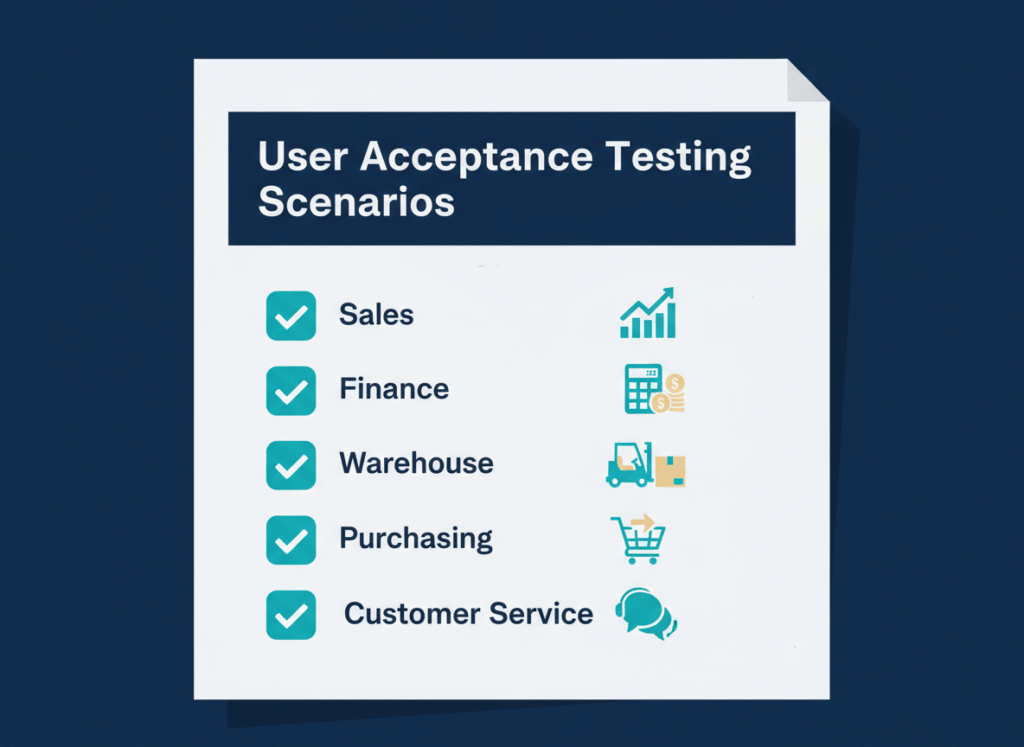
Scenario 1: Standard Order (Sales)
- Customer calls, wants to place order
- Sales rep creates sales order in ERP
- Adds 3 items, applies 10% discount
- Calculates tax and shipping
- Saves order, sends confirmation to customer
- Expected result: Order total correct, customer receives email ✓
Scenario 2: Order Fulfillment (Warehouse)
- Order appears in pick queue
- Picker scans items, confirms quantities
- Delivers to packing station
- Packer generates shipping label
- Packs order, scans label, marks shipped
- Expected result: Inventory decreased, customer receives tracking ✓
Scenario 3: Invoicing & Payment (Finance)
- Order shipped, ready to invoice
- Finance creates invoice from sales order
- Invoice posts to AR
- Customer pays via credit card
- Payment applied to invoice
- Expected result: AR balance correct, payment reconciled ✓
Scenario 4: Purchase Order (Purchasing)
- Item low in stock, reorder needed
- Purchasing creates PO
- PO routed for approval
- Manager approves
- PO sent to vendor
- Expected result: PO in vendor’s system, confirmation received ✓
Scenario 5: Inventory Receipt (Warehouse)
- Vendor shipment arrives
- Warehouse receives against PO
- Scans items, confirms quantities
- Posts receipt
- Items available for sale
- Expected result: Inventory increased, PO marked received ✓
Scenario 6: Customer Return (Customer Service)
- Customer wants to return item
- CS creates return authorization
- Customer ships item back
- Warehouse receives return
- Finance issues credit memo
- Expected result: Inventory increased, AR decreased ✓
Scenario 7: Vendor Return (Purchasing)
- Received wrong item from vendor
- Purchasing creates vendor return
- Warehouse ships back to vendor
- Finance receives vendor credit
- Expected result: Inventory decreased, AP decreased ✓
Scenario 8: Month-End Close (Finance)
- Run month-end checklist
- Reconcile AR, AP, inventory
- Post adjustments
- Generate financial statements
- Close period
- Expected result: Books balanced, period locked ✓
Create 10-15 scenarios covering all critical workflows.
Step 2: Assign Testers (Week 20)
CRITICAL: Actual end users must test, not IT!
- Sales team tests order entry (Scenarios 1, 6)
- Warehouse team tests fulfillment (Scenarios 2, 5, 7)
- Finance team tests invoicing, payments, close (Scenarios 3, 8)
- Purchasing team tests PO creation (Scenarios 4, 7)
- Customer service tests returns (Scenario 6)
Each tester:
- Receives test script (step-by-step instructions)
- Logs into test environment (not production!)
- Executes scenarios
- Documents results (pass/fail, issues found)
Step 3: Execute UAT (Week 21)
- Week 21: Full UAT
Monday-Wednesday:
- All testers execute their scenarios
- Log issues in issue tracker (Jira, Excel, etc.)
- Implementation partner available for support
Issue tracking:
Copy table
Severity levels:
- Critical: Blocks core workflow, must fix before go-live
- High: Impacts workflow, should fix before go-live
- Medium: Minor inconvenience, can fix after go-live
- Low: Cosmetic, can fix after go-live
Thursday-Friday:
- Dev team fixes critical and high issues
- Testers retest fixed issues
- Sign-off on resolved issues
Go/no-go criteria:
- All critical issues resolved ✓
- All high issues resolved or have workarounds ✓
- Medium/low issues documented for post-go-live ✓
Step 4: Performance Testing (Week 22)
Why this matters: System works fine with 1 user. What about 50 users during peak hours?
-
Concurrent user testing
- 10 users: Response time <2 seconds ✓
- 25 users: Response time <3 seconds ✓
- 50 users: Response time <5 seconds ✓
- 100 users: Response time <10 seconds ✓
-
Peak transaction volume
- Simulate Black Friday: 2,500 orders in 8 hours
- System handles load without crashing ✓
- No failed transactions ✓
-
Integration performance
- E-commerce orders: 100 orders/hour sync to ERP ✓
- Shipping labels: 50 labels/hour generate ✓
- No API timeouts ✓
If performance issues found:
- Optimize database queries
- Increase server resources
- Adjust integration timing (batch vs. real-time)
- Retest until performance acceptable
Step 5: Get Sign-Off (Week 22)
-
Department champions sign off:
- Finance: “System ready for go-live” ✓
- Operations: “System ready for go-live” ✓
- Sales: “System ready for go-live” ✓
- IT: “System ready for go-live” ✓
-
Steering committee approval:
- Review UAT results
- Review open issues (all critical/high resolved)
- Review performance test results
- Decision: Proceed to go-live ✓
Red flags:
- IT doing all testing (users must test!) → Users won’t know how to use system
- Skipping performance testing → System crashes on day 1
- Going live with open critical issues → Guaranteed problems

Common Data Migration & Testing Mistakes
Mistake 1: “Our Data Is Fine”
Reality:
- 60% of companies have 20%+ duplicate records
- 40% have 10%+ missing required fields
- 80% have inconsistent formats
How to avoid:
- Run data quality assessment (3-4 weeks)
- Allocate 6-8 weeks for cleanup
- Validate before AND after migration
Mistake 2: Migrating Too Much History
Reality:
- Migrating 15 years of transactions slows system
- 90% of that data never accessed
- Increases migration time 3-5x
How to avoid:
- Migrate 1-2 years of closed transactions
- Archive older data (keep in legacy system for reference)
- Focus on operational data, not historical
Mistake 3: No Test Migrations
Reality:
- “We’ll migrate once, on go-live weekend”
- Day 1: Data doesn’t balance, orders fail, chaos
How to avoid:
- Run 2-3 test migrations
- Fix issues after each test
- Don’t proceed until test migration is perfect
Mistake 4: Users Don’t Test
Reality:
- IT tests everything, says “it works”
- Day 1: Users don’t know how to use system
How to avoid:
- Actual end users must perform UAT
- Test realistic scenarios (not just “create order”)
- Users sign off that system is ready
Real-World Example: Automotive E-Commerce Data Migration
Client: $50M automotive parts e-commerce
Challenge: Migrate from legacy system to NetSuite
Challenge: Migrate from legacy system to NetSuite
Data scope:
- 50K customers (25K after cleanup)
- 100K SKUs (80K after cleanup)
- 15 years history (migrated 2 years)
- $2M AR, $1.5M AP, $5M inventory
Timeline:
- Week 1-4: Data assessment
- Week 5-10: Data cleanup (longer than planned!)
- Week 11-12: Test migration #1 (15% failure rate)
- Week 13-14: Fix issues, test migration #2 (3% failure rate)
- Week 15-16: Fix issues, test migration #3 (0% failure rate)
- Week 17-20: UAT (found 12 issues, all resolved)
- Week 21: Performance testing (passed)
- Week 22: Go-live weekend
Final migration:
- Friday 5 PM: Freeze legacy system
- Saturday 8 AM – 2 PM: Data migration (6 hours)
- Saturday 2 PM – 8 PM: Validation (all balanced!)
- Sunday: User acceptance validation
- Monday 8 AM: Go-live ✓
Result:
- Zero data discrepancies
- Zero failed orders day 1
- Smooth go-live
Key success factor: 3 test migrations caught all issues before go-live.
About TopSource Global
We’ve migrated data for automotive e-commerce clients with 100K+ SKUs, 50K+ customers, and 15 years of transaction history. Our nearshore teams deliver NetSuite data migration at 40-60% below US rates.
15 years supporting US automotive e-commerce operations. We understand the unique challenges of high-volume, multi-SKU data migration.
What’s Next?
Continue to Part 3: ERP Go-Live Checklist: Post-Implementation Success Guide →
Learn how to:
- Train users effectively
- Execute smooth go-live
- Provide hypercare support
- Measure success