


Integration monitoring for ecommerce is not “nice to have” – it’s the difference between a recoverable incident and a silent revenue leak. Most integration failures don’t look like downtime. They look like backlog, retries, duplicates, missing statuses, and finance drift.
If you run NetSuite plus a stack of connectors (3PL, payment, tax, fraud, marketplace, iPaaS), you already know the pattern: everything is “green” until orders stop shipping, refunds pile up, or reconciliation turns into a spreadsheet fight.
Why integration monitoring for ecommerce fails (and why you notice too late)
In ecommerce, integrations fail in ways that bypass classic uptime monitoring:
- Jobs keep running, but produce partial output (missing lines, skipped records, wrong statuses).
- Retries hide the problem until you hit rate limits or create duplicates.
- Errors move downstream and show up as WISMO, cancel requests, refund escalations, or chargebacks.
- Finance sees it last as deltas between captured, shipped, refunded, and posted.
So the goal is not “monitor the integration.” The goal is to monitor business outcomes and the few technical signals that predict when outcomes will break.
Integration monitoring for ecommerce: the minimum viable dashboard (6 metrics)
You can build a useful monitoring layer without a big observability project. Start with six metrics that map directly to revenue and close risk. Track them per integration surface (REST, middleware, iPaaS, scripts) and per business function (orders, payments, shipping, refunds, finance, reporting).
Integration monitoring for ecommerce metric #1: auth failure rate (by integration + endpoint)
Auth failures are the easiest to log and the easiest to ignore. Don’t track “auth errors” as a single bucket. Track:
- Auth failures per endpoint (RESTlet vs REST Web Services vs SuiteTalk vs SuiteQL service).
- Auth failures per integration owner (vendor connector vs internal service).
- Token refresh failures separately from “invalid login.”
Why it matters: auth failures often start as a small spike (expired token, role change, permission tweak) and then become a backlog that hits shipping, refunds, or bank matching later.
Operator rule: if auth failures spike, your first action is not “retry more.” Your first action is to stop the bleeding: pause the job or throttle it, then fix credentials/roles, then resume with a controlled replay.
Integration monitoring for ecommerce metric #2: queue depth + queue aging (minutes/hours, not counts)
Queue depth is a vanity metric. Queue aging is the one that hurts.
- Queue depth: how many items are waiting.
- Queue aging: how long the oldest item has been waiting.
For ecommerce, aging is the signal that predicts customer-facing impact:
- Orders: aging creates late shipments and cancel requests.
- Payments: aging creates failed captures, duplicate attempts, and support escalations.
- Refunds: aging creates disputes and chargebacks.
Threshold idea: define aging SLAs by function (example: orders 30-60 min, shipping 60-120 min, refunds 24h) and alert on aging, not volume.
Related: if you run holds and exception queues, tie monitoring to your operational loop. This is where an order-holds system pays off: Order Holds Playbook.
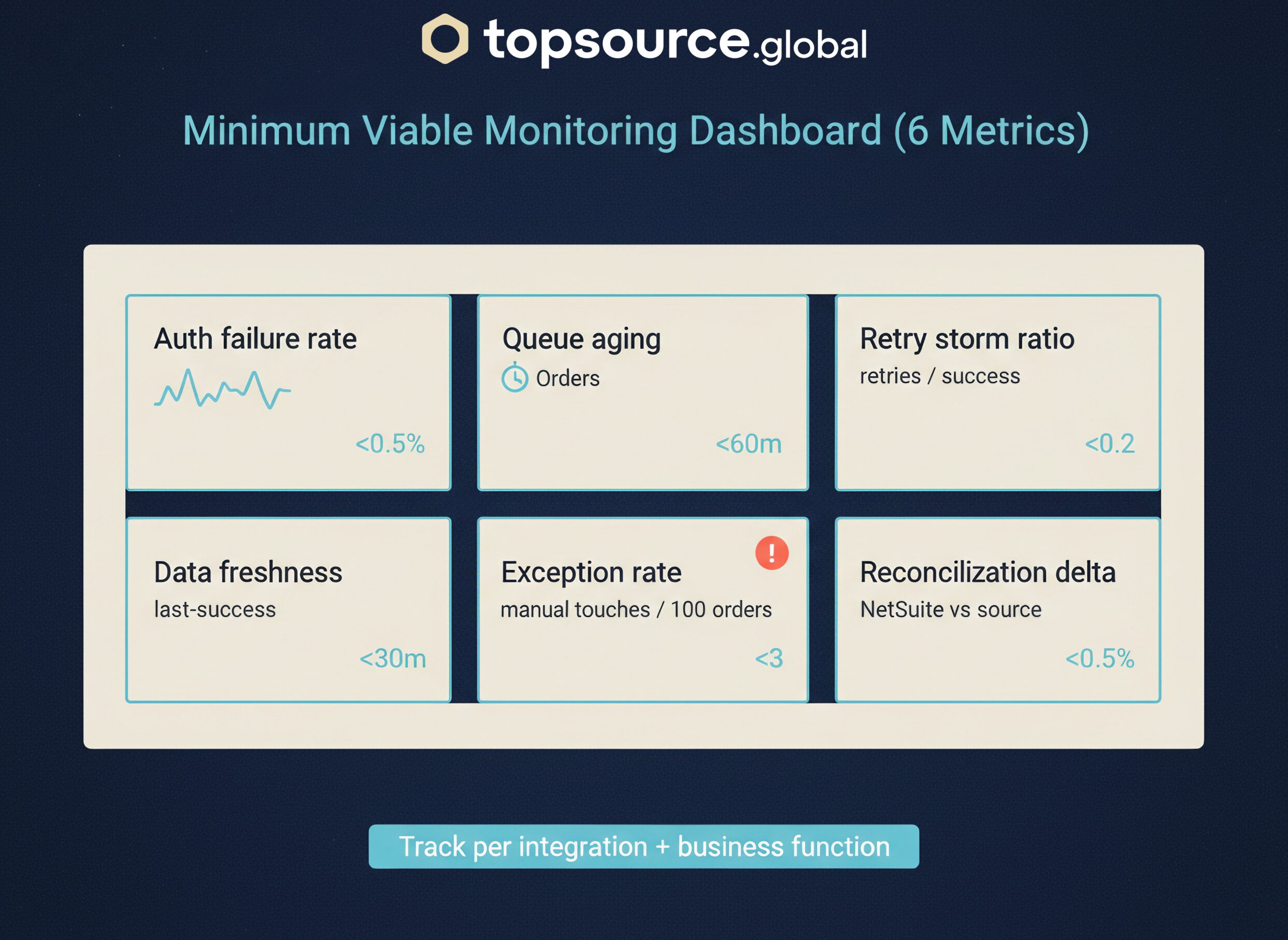
Integration monitoring for ecommerce metric #3: retry storm indicator (retries per successful transaction)
Retries are not free. A retry storm is how you turn a small incident into a production outage.
Track a simple ratio:
Retries per successful transaction (per integration, per endpoint).
Why it matters:
- Retry storms trigger rate limits and timeouts.
- They create duplicates if you don’t have idempotency.
- They create double-capture or double-refund risk if you retry the wrong step.
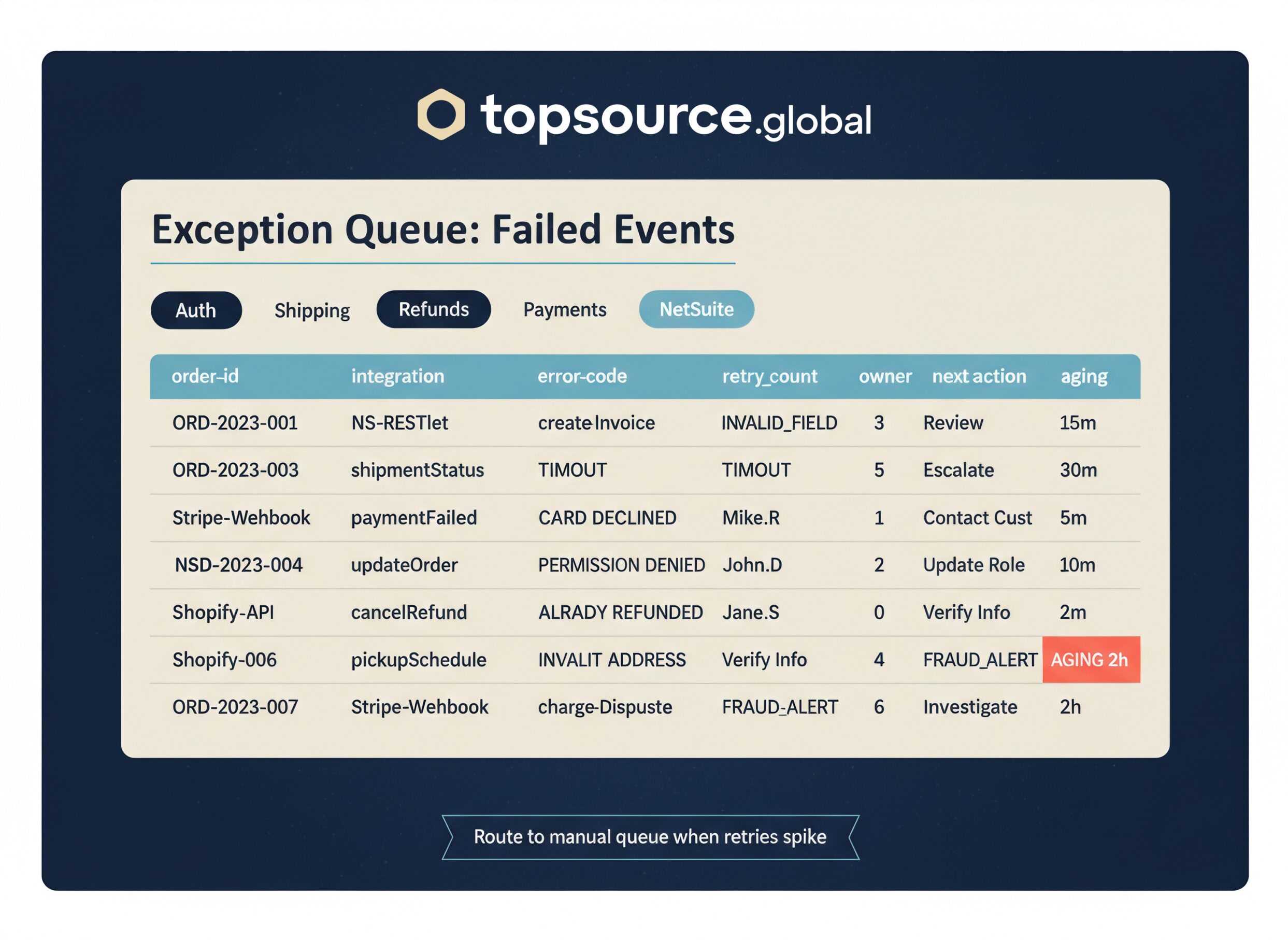
Operator rule: if retries spike, implement a circuit breaker behavior: throttle, pause, or route to a manual exception queue. “Keep retrying” is not a strategy.
Integration monitoring for ecommerce metric #4: data freshness (last-success timestamp)
Every integration should have a “last good run” timestamp. If you can’t answer “when did this last work,” you’re blind.
Track:
- Last-success timestamp per integration job.
- Last-success timestamp per business function (orders, shipping, refunds).
Why it matters: freshness catches silent failures where jobs run but produce no output (filters changed, permissions changed, empty payloads, upstream API changes).
Operator rule: alert on freshness breaches with a clear SLA. “No successful order import in 30 minutes” is actionable. “Integration error count increased” is not.
Integration monitoring for ecommerce metric #5: exception rate (manual touches per 100 orders)
If your team is doing more manual work, something upstream is breaking. Exception rate is the bridge between integration monitoring and ops reality.
Track manual touches per 100 orders across your core exception queues:
- Payment review
- Address fix
- Stop-ship / cancel-before-ship
- 3PL intercept / re-route
- RTS and refund holds
Why it matters: exception rate is a leading indicator of WISMO, cancellations, refund delays, and chargebacks. If you want to reduce WISMO volume, you need to see exceptions early: How to Eliminate WISMO Tickets.
Integration monitoring for ecommerce metric #6: reconciliation deltas (NetSuite vs source of truth)
This is the finance-owner metric. It’s also the one that keeps close from turning into a war room.
Pick a small set of daily deltas that matter:
- Orders: count and gross amount (storefront vs NetSuite)
- Payments: captured amount (processor vs NetSuite)
- Shipping: shipped count (3PL vs NetSuite)
- Refunds: refunded amount (processor vs NetSuite)
Why it matters: you don’t need perfect real-time reconciliation. You need a daily control loop that catches drift before month-end.
Operator rule: define a tolerance (example: 0.2-0.5% or a dollar threshold) and force a root-cause review when you breach it. No tolerance = endless noise. No review = drift becomes “normal.”
Integration monitoring for ecommerce needs ownership (so alerts don’t die in Slack)
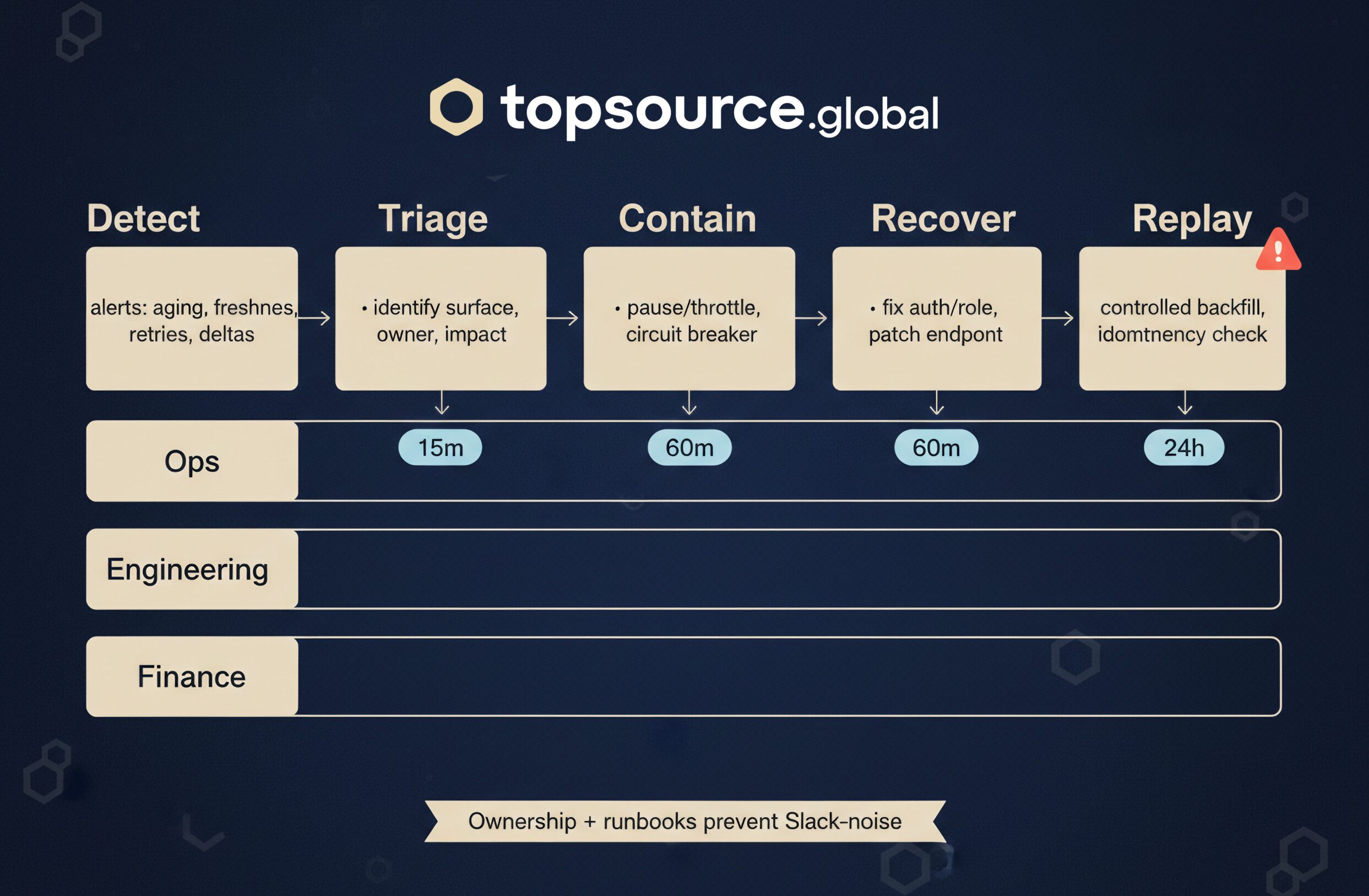
Monitoring without ownership is just more noise. For each integration surface, assign:
- Primary owner (can change it, can pause it)
- Backup owner (knows the runbook, has access)
- Escalation path (vendor ticket, internal engineering, finance sign-off)
- Cutover window rules (when you’re allowed to replay, when you’re not)
If you can’t name an owner, treat the integration as a risk item. “Everyone owns it” means no one can fix it at 2am.
Integration monitoring for ecommerce: what to implement in 7 days
Here’s a practical 7-day plan that works even if your stack is messy:
- Day 1: define the integration inventory (surface, auth, business function, owner).
- Day 2: standardize logging fields: correlation ID, job ID, endpoint, account, error code, retry count.
- Day 3: implement last-success timestamps for each job.
- Day 4: add queue aging metrics for orders, shipping, refunds.
- Day 5: add retry storm ratio and basic circuit breaker behavior.
- Day 6: add daily reconciliation deltas (4 numbers, not 40).
- Day 7: write a one-page runbook per critical integration: alert, triage, contain, recover, replay rules.
If you want a reference for instrumentation standards, OpenTelemetry is a good baseline. For monitoring philosophy in distributed systems, Google’s SRE guidance is still the clearest.
Integration monitoring for ecommerce: common traps (and fixes)
- Trap: monitoring only uptime. Fix: monitor queue aging, freshness, and deltas.
- Trap: no correlation IDs. Fix: add request/job IDs so you can trace a single order end-to-end.
- Trap: retries without idempotency. Fix: define replay rules and prevent double-capture/double-refund.
- Trap: alerts without runbooks. Fix: one page per integration: triage, contain, recover, replay.
Bottom line
If you only do one thing this month, do this: build a dashboard that shows queue aging, last success, retries, and finance deltas for your revenue-critical integrations. That’s the difference between “we had an incident” and “we lost a week and don’t know where the money went.”
If you want help, TopSource Global typically starts with a 60-90 minute integration audit: inventory, criticality ranking, monitoring metrics, alert rules, and runbooks you can execute without downtime surprises.