


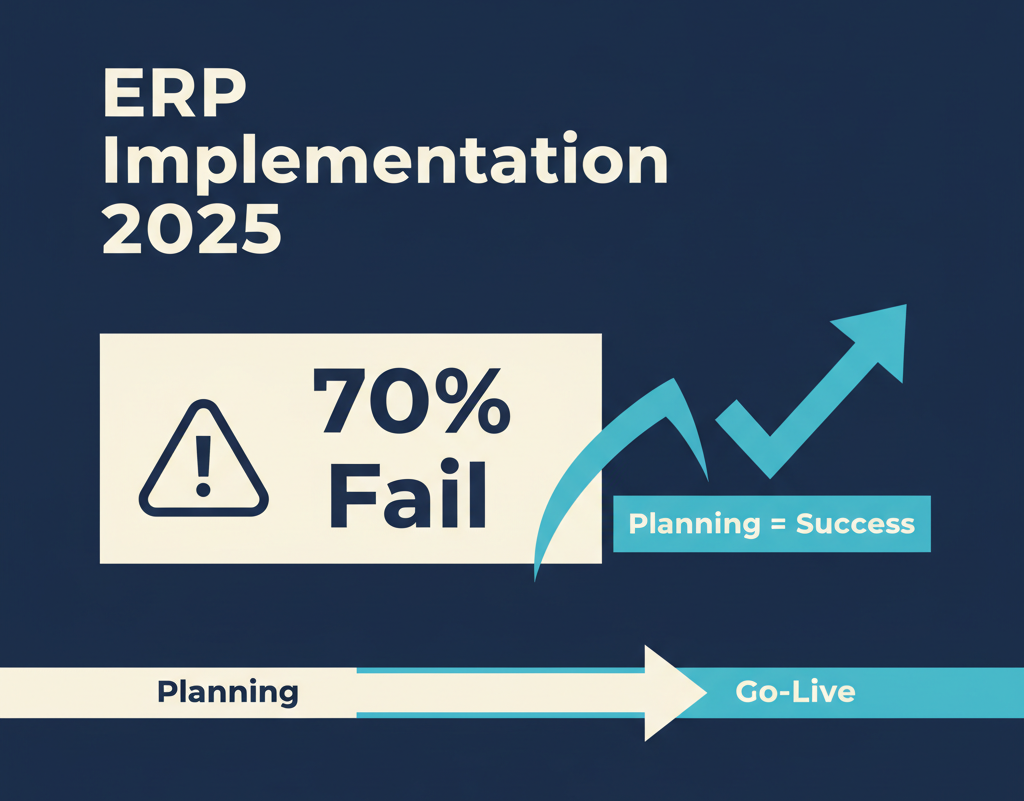
70% of ERP implementations fail or significantly exceed budget.
This ERP implementation checklist covers everything you need: planning, vendor selection, team building, and timeline management. Companies that skip these steps pick the wrong vendor or underestimate resource requirements.
Not because the software is bad. Because companies skip planning, pick the wrong vendor, or underestimate resource requirements.
An ERP implementation isn’t an IT upgrade. It’s a business transformation that touches every department, every process, every employee.
We’ve implemented NetSuite ERP for automotive e-commerce businesses processing $10M-$100M annually. Here’s the planning checklist that prevents the costly mistakes most companies make.
Why Planning Determines Success
The Statistics:
-
70% of ERP projects fail to meet objectives or exceed budget (Panorama Consulting, 2024)
-
Average implementation time: 16 months (planned: 12 months)
-
Average cost overrun: 35-50% above budget
-
Top failure cause: Inadequate planning (40% of failures)
The good news: Proper planning prevents 80% of these failures.
PHASE 1: Pre-Implementation Planning (Weeks 1-4)
✅ Business Case & Executive Sponsorship 
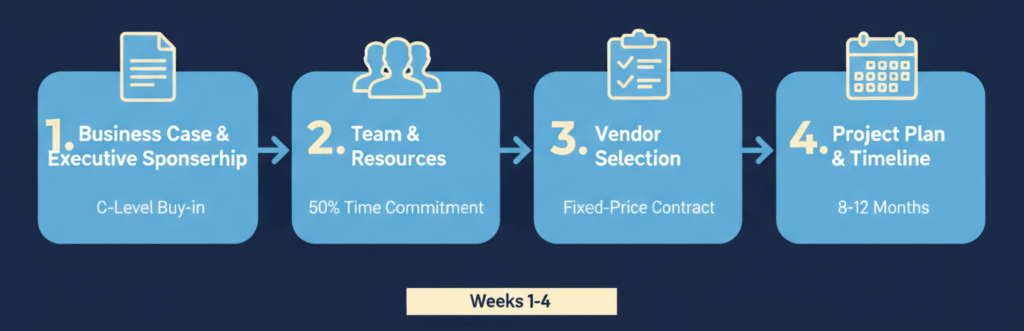
Why this matters: Without C-level buy-in, your project stalls when budgets tighten or timelines slip.
Checklist:
-
Document current pain points with quantified impact
-
“Manual order entry costs 15 hours/week = $30K/year”
-
“System can’t handle 1,000+ daily orders”
-
“No integration with e-commerce platform = 5% order errors”
-
“Month-end close takes 10 days, should take 3”
-
-
Define measurable success metrics
-
Order processing time: reduce from 8 minutes to 2 minutes
-
Month-end close: reduce from 10 days to 3 days
-
Inventory accuracy: improve from 85% to 98%
-
Cost per order: reduce from $12 to $5
-
-
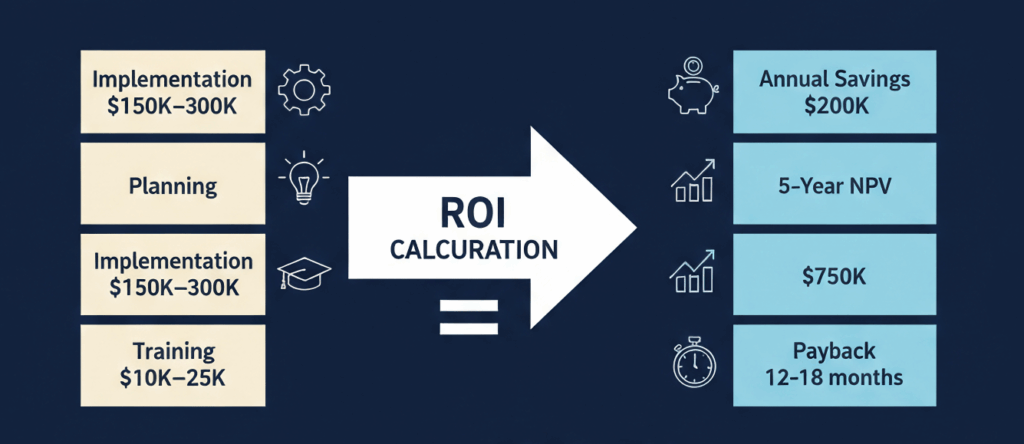
Calculate realistic ROI
-
Implementation cost: $150K-$300K
-
Annual savings: $200K (labor + efficiency + error reduction)
-
Payback period: 12-18 months
-
5-year NPV: $750K
-
-
Secure executive sponsor (C-level required)
-
CEO, CFO, or COO as primary sponsor
-
Weekly 30-minute status meetings
-
Authority to make decisions and allocate resources
-
Budget approval authority
-
-
Establish steering committee
-
Finance Director
-
Operations Director
-
IT Director
-
Sales Director
-
Monthly meetings (minimum)
-
Go/no-go decision authority
-
Red flags:
-
“IT will handle it” → Needs business ownership, not just IT
-
“We’ll figure out ROI later” → Recipe for budget overruns
-
“The VP will check in occasionally” → Needs active C-level sponsor
Real example: Automotive e-commerce client processing 600 orders/day. Current system couldn’t scale beyond 800. Business case: $250K implementation enables growth to 1,500 orders/day without hiring. ROI: 14 months. CFO became executive sponsor, approved budget, weekly meetings for 9 months.
✅ Team & Resources
Why this matters: ERP implementation requires 20-40% of key employees’ time for 6-12 months. Underestimate this, and your project fails.
Checklist:
-
Identify dedicated project manager
-
Full-time on project (not “20% of their time”)
-
Previous ERP implementation experience preferred
-
Authority to escalate issues to steering committee
-
Budget: $80K-$120K for 9-12 months
-
-
Assign department champions (1 per major department)
-
Finance: Controller or Senior Accountant (50% time, 6 months)
-
Operations: Warehouse Manager (50% time, 6 months)
-
Sales: Sales Operations Manager (30% time, 4 months)
-
IT: Systems Administrator (50% time, 9 months)
-
-
Define roles & responsibilities (RACI matrix)
-
Responsible: Who executes the task
-
Accountable: Who makes final decision
-
Consulted: Who provides input
-
Informed: Who needs to know
-
-
Allocate realistic time commitments
-
Project manager: 100% for 9-12 months
-
Department champions: 50% for 6 months
-
Key users: 20% for 3 months (testing, training)
-
End users: 10% for 2 months (training period)
-
-
Backfill critical roles
-
Hire temp staff to cover champion’s normal duties
-
Don’t expect champions to do “both jobs”
-
Budget: $40K-$60K for temp coverage
-
-
Budget for external help
-
Implementation partner: $75K-$250K
-
Data migration specialist: $15K-$40K
-
Custom development: $20K-$80K
-
Training: $10K-$25K
-
Red flags:
-
“Our team will do this in their spare time” → Won’t happen
-
“We don’t need a dedicated PM” → Project will drift
-
“IT can handle everything” → Business process knowledge is critical
Real example: Client tried ERP implementation with “20% time” commitments. Project stalled after 8 months, zero progress. Restarted with dedicated PM, 50% champion time. Completed in 10 months.
✅ Vendor Selection & Contract Negotiation
Why this matters: Wrong ERP = expensive mistake. Right ERP + wrong implementation partner = also expensive mistake.
Checklist:
Step 1: Define Requirements
-
Industry-specific features
-
Automotive: fitment data, VIN lookup, core charges
-
Manufacturing: BOM, work orders, shop floor control
-
Retail: POS, multi-location inventory, promotions
-
Distribution: lot/serial tracking, 3PL integration
-
-
Integration requirements
-
E-commerce: Shopify, Magento, BigCommerce
-
Shipping: FedEx, UPS, USPS, freight carriers
-
Payment: Stripe, PayPal, http://Authorize.net
-
EDI: vendor/customer integrations
-
Tax: Avalara, TaxJar
-
-
Scalability needs
-
Current: 600 orders/day, 50K SKUs, 10 users
-
3-year projection: 1,500 orders/day, 150K SKUs, 25 users
-
Peak capacity: 2,500 orders/day (Black Friday)
-
-
Must-have vs. nice-to-have
-
Must-have: Multi-location inventory, drop ship, EDI
-
Nice-to-have: Advanced WMS, CRM, project management
-
Step 2: Evaluate ERP Systems
-
NetSuite
-
Best for: E-commerce, scalability, cloud-native
-
Pricing: $999/mo + $99/user
-
Implementation: 6-12 months
-
-
SAP Business One
-
Best for: Manufacturing, complex operations
-
Pricing: $1,500-$3,000/user (perpetual)
-
Implementation: 9-15 months
-
-
Microsoft Dynamics 365
-
Best for: Microsoft ecosystem integration
-
Pricing: $70-$210/user/month
-
Implementation: 6-12 months
-
-
Oracle ERP Cloud
-
Best for: Enterprise, global operations
-
Pricing: Custom (typically $100K+/year)
-
Implementation: 12-18 months
-
-
Acumatica
-
Best for: Flexible licensing, industry editions
-
Pricing: $1,500-$2,500/month (unlimited users)
-
Implementation: 6-10 months
-
Step 3: Request Demos with Your Data
-
Provide sample data (customers, items, orders)
-
Test critical workflows end-to-end
-
Involve department champions in evaluation
-
Score each system (1-10) on key criteria
Step 4: Check References
-
Request 3-5 references (same industry, similar size)
-
Ask specific questions:
-
“Did they hit timeline?” (50% say no)
-
“Did they stay on budget?” (60% say no)
-
“Would you choose them again?” (critical question)
-
“What went wrong?” (learn from their mistakes)
-
Step 5: Evaluate Implementation Partners
-
Certification: NetSuite SuiteSuccess, Microsoft Gold Partner, etc.
-
Industry experience: 5+ implementations in your industry
-
Team size: Dedicated team (not shared across 10 projects)
-
Pricing model: Fixed-price preferred (protects you from overruns)
-
Post-go-live support: 4-8 weeks included? SLA?
Step 6: Negotiate Contract
Critical terms to negotiate:
-
Scope: Detailed statement of work (SOW)
-
Deliverables listed explicitly
-
What’s included vs. additional cost
-
Change order process defined
-
-
Timeline: Milestones with dates
-
Phase 1: Design (Week 8)
-
Phase 2: Configuration (Week 16)
-
Phase 3: Testing (Week 22)
-
Phase 4: Go-Live (Week 26)
-
Penalties for delays (10% reduction per month late)
-
-
Budget: Fixed-price strongly preferred
-
Total cost: $200K (example)
-
Payment schedule: 20% upfront, 30% at design sign-off, 30% at UAT, 20% at go-live
-
Cap on overruns: Not to exceed $220K (10% buffer)
-
-
Customizations: Included vs. additional
-
40 hours customization included
-
Additional: $150/hour
-
-
Training: Hours and format
-
40 hours training included
-
Onsite vs. remote
-
Train-the-trainer included
-
-
Support: Post-go-live support
-
4 weeks hypercare included
-
8 hours/week support
-
Response SLA: 4 hours for critical, 24 hours for high
-
-
Exit clause: Termination terms
-
Either party can terminate with 30 days notice
-
Refund policy if project fails
-
IP ownership (customizations belong to you)
-
Red flags:
-
Vendor won’t provide references → Why not?
-
Implementation partner has no industry experience → They’ll learn on your dime
-
Contract is vague on scope/deliverables → Guaranteed overruns
-
“Time and materials” pricing with no cap → Budget will explode
Real example: Client signed vague contract: “Implement NetSuite for automotive e-commerce.” No detailed SOW. Project went 18 months, $400K over budget. Disputes over what was “included.” Eventually settled, but painful.
✅ Project Plan & Timeline
Why this matters: “We’ll go live in 6 months” without detailed plan = 12-month project.
Checklist:
-
Create detailed project plan (week-by-week)
Realistic Timeline (Mid-Market Company):
|
Phase |
Duration |
Key Activities |
|---|---|---|
|
Phase 1: Planning |
4 weeks |
Business case, team, vendor selection |
|
Phase 2: Design |
6-8 weeks |
Process mapping, gap analysis, sign-off |
|
Phase 3: Configuration |
8-12 weeks |
System setup, customizations, integrations |
|
Phase 4: Data Migration |
4-6 weeks |
Data cleanup, test migrations, validation |
|
Phase 5: Testing |
4-6 weeks |
Unit testing, UAT, performance testing |
|
Phase 6: Training |
3-4 weeks |
Train-the-trainer, end user training |
|
Phase 7: Go-Live |
1-2 weeks |
Cutover, go-live, stabilization |
|
Phase 8: Post-Go-Live |
4-8 weeks |
Hypercare, optimization, handoff |
|
Total |
34-50 weeks |
8-12 months |
-
Identify dependencies (critical path)
-
Can’t configure until design complete
-
Can’t migrate data until configuration done
-
Can’t train until system configured
-
Can’t go live until testing complete
-
-
Build in buffer time (20-30% contingency)
-
Unexpected issues: 2 weeks
-
Data quality worse than expected: 2 weeks
-
Key people unavailable: 1 week
-
Customizations take longer: 2 weeks
-
Total buffer: 7 weeks
-
-
Define milestones (go/no-go decision points)
-
Week 8: Design sign-off (steering committee approval)
-
Week 16: Configuration sign-off (UAT environment ready)
-
Week 22: Data migration sign-off (data validated)
-
Week 26: Testing sign-off (all tests passed)
-
Week 28: Go-live approval (final steering committee decision)
-
-
Set realistic go-live date
-
Avoid: Month-end, quarter-end, year-end (accounting chaos)
-
Avoid: Peak season (Black Friday, holiday rush)
-
Prefer: Mid-month, off-season
-
Prefer: Weekend or holiday go-live (minimize disruption)
-
Example: Go-live Saturday, Feb 15 (mid-month, off-season)
-
Red flags:
-
“We’ll go live in 3 months” → For complex business = unrealistic
-
No detailed week-by-week plan → Will drift
-
No buffer time → Guaranteed delays
-
Go-live Dec 31 or Black Friday → Disaster waiting to happen
Real example: Client insisted on 6-month timeline (should be 10 months). Skipped proper testing, went live during peak season. System crashed day 1. Reverted to old system. Restarted project, took 14 months total.
Common Planning Mistakes (And How to Avoid Them)

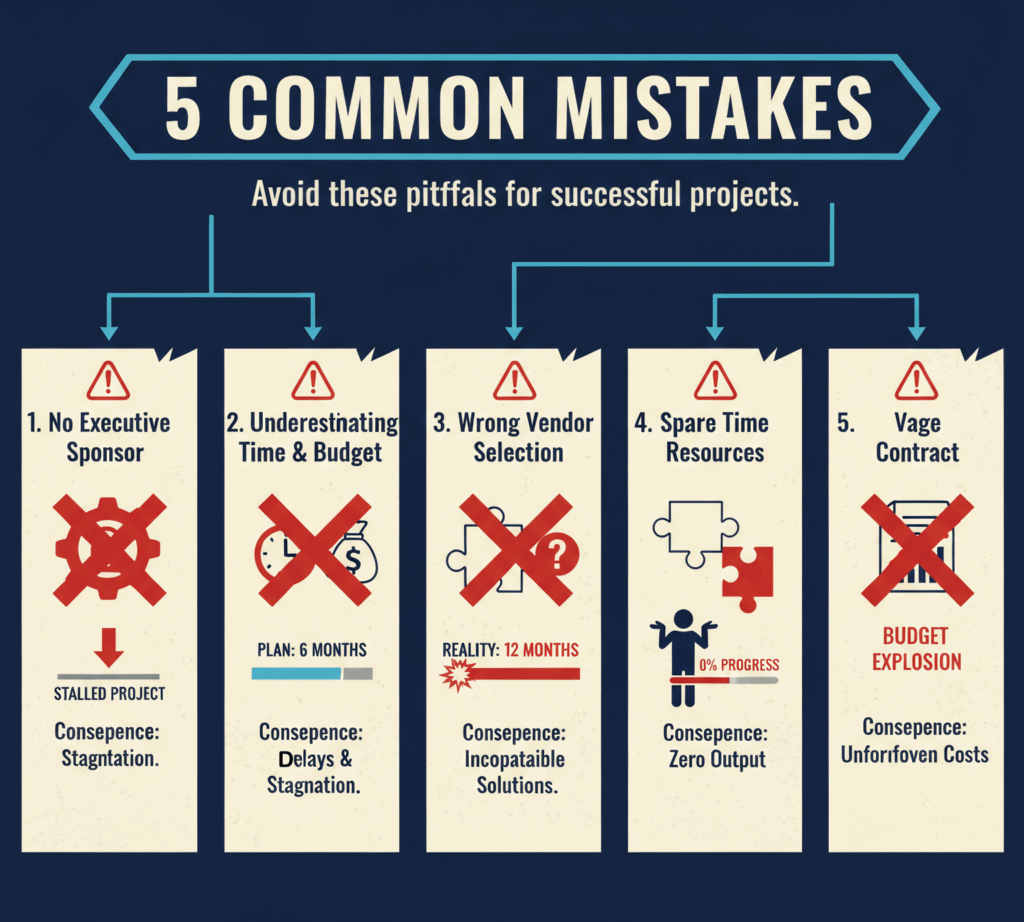
Mistake 1: No Executive Sponsor
What happens: Project manager can’t get budget approval, resource allocation, or decisions made. Project stalls.
How to avoid:
-
Secure C-level sponsor before starting
-
Weekly 30-minute meetings (non-negotiable)
-
Sponsor attends all steering committee meetings
Mistake 2: Underestimating Time & Budget
What happens:
-
Plan: 6 months, $150K
-
Reality: 12 months, $250K
-
Credibility destroyed, project at risk
How to avoid:
-
Use realistic timelines (8-12 months for mid-market)
-
Add 20-30% buffer to budget
-
Track weekly (budget, timeline, scope)
-
Escalate issues immediately
Mistake 3: Wrong Vendor Selection
What happens: ERP doesn’t fit your business. Expensive customizations required. Or worse, you outgrow it in 2 years.
How to avoid:
-
Define requirements before evaluating vendors
-
Test with your data (not generic demos)
-
Check references (same industry, similar size)
-
Think 3-5 years ahead (scalability)
Mistake 4: “Spare Time” Resource Allocation
What happens: “Our team will do this in their spare time.” Six months later, zero progress.
How to avoid:
-
Dedicated PM (100% time)
-
Department champions (50% time, backfilled)
-
Document time commitments
-
Track weekly (are people actually spending the time?)
Mistake 5: Vague Contract
What happens: “Implement ERP” with no detailed SOW. Disputes over what
‘s included. Budget explodes. Relationship sours.
How to avoid:
-
Detailed statement of work (SOW)
-
List every deliverable explicitly
-
Fixed-price or capped time-and-materials
-
Change order process defined
-
Exit clause if project fails
ERP Planning Cost Breakdown
Typical Planning Phase Costs (Mid-Market, $10M-$50M Revenue):
|
Cost Category |
Range |
Notes |
|---|---|---|
|
Business case development |
$5K-$15K |
Internal time + consultant (optional) |
|
Vendor evaluation |
$10K-$25K |
Demos, reference checks, RFP process |
|
Project manager (4 weeks) |
$8K-$12K |
Full-time, dedicated |
|
Department champions (4 weeks) |
$15K-$25K |
50% time, 4 people |
|
Implementation partner (planning) |
$15K-$40K |
Discovery, SOW creation, project plan |
|
Legal (contract review) |
$2K-$5K |
Attorney review of vendor contracts |
|
Total Planning Phase |
$55K-$122K |
10-15% of total project cost |
Copy table
ROI of proper planning:
-
Reduces implementation time by 20-30%
-
Reduces cost overruns by 40-50%
-
Increases success rate from 30% to 80%+
Skipping planning costs more than doing it right.
Next Steps: Your ERP Planning Checklist
Week 1: Business Case
-
Document current pain points (quantified)
-
Define success metrics (measurable)
-
Calculate ROI (realistic)
-
Present to executive team
-
Secure C-level sponsor
Week 2: Team & Resources
-
Identify project manager
-
Assign department champions
-
Define roles (RACI matrix)
-
Allocate time commitments
-
Budget for backfill and external help
Week 3: Vendor Selection
-
Define requirements (must-have vs. nice-to-have)
-
Evaluate 3-5 ERP systems
-
Request demos with your data
-
Check references
-
Shortlist 2 vendors
Week 4: Contract & Timeline
-
Evaluate implementation partners
-
Negotiate contract (scope, timeline, budget)
-
Create detailed project plan
-
Set realistic go-live date
-
Get steering committee approval
About TopSource Global
We’ve implemented NetSuite ERP for automotive e-commerce businesses processing $10M-$100M annually. Our nearshore teams in Ukraine and Moldova deliver NetSuite implementation at 40-60% below US rates without sacrificing quality.
15 years supporting US automotive e-commerce operations. We understand the unique challenges of high-volume, multi-SKU, drop-ship operations.
Need help planning your ERP implementation?
Contact us: [email protected] | https://topsource.global