


Post go-live chaos is common after migrating to NetSuite, especially in high-volume e-commerce.
When you moved to NetSuite, you replaced the old system, signed the contract, and your implementation partner said “go-live.” Everyone felt that familiar relief – like the hard part was over.
Then the week after go-live hit. And for a lot of e-commerce teams, it never really stopped.
Orders don’t flow the way they should. Inventory in NetSuite doesn’t match what the warehouse says is actually on the shelf. Finance can’t close the month without a pile of manual work. Support is drowning in “where is my order?” tickets. And every small issue turns into a wild goose chase through tickets, meetings, and two-week waits.
It’s not that you’re bad at running a business. NetSuite just doesn’t cover up problems. It shines a light on them.
NetSuite didn’t create these issues – it revealed them. Legacy systems are more forgiving. People build workarounds. Someone “knows how it works.” Bad data gets patched with tribal knowledge.
NetSuite is less forgiving. It forces structure. So after migration, you don’t just get a new ERP. You run straight into every weak spot at once.
Usually that includes no clear owner for things like order holds, credits, returns, and cancellations – plus a master data mess (items, kits, locations, tax codes, vendors, units of measure).
Post-migration issues are rarely “a NetSuite bug.” They’re almost always one of these:
- Broken process ownership: nobody owns holds, exceptions, returns, credits end-to-end
- Incomplete master data: item types, kits, locations, tax codes, vendors, UoM, attributes
- Integration gaps: Shopify/Magento/Amazon, 3PL, carriers, tax engines, fraud tools
- Wrong roles/permissions: people can’t do their job – or can do too much
- Workflow logic that doesn’t match reality: the ERP diagram looks clean, the business doesn’t
That’s why it feels like NetSuite “made things worse.” It didn’t. It removed the duct tape.
How to Fix Post Go-Live Chaos: Stabilize First, Then Optimize
Most owners try the same path:
- ask the internal team to “figure it out”
- open tickets with the implementation partner
- hire a NetSuite admin
- buy another connector
- push issues into spreadsheets “for now”
It’s rational. It’s also how chaos becomes permanent.
1) You don’t have time to become a NetSuite operator
NetSuite isn’t something you learn between calls.
To diagnose post-migration issues, you need to understand:
- transaction flow (SO → IF → fulfillment → invoice → payment)
- item types (assemblies, kits, matrix items) and how they hit inventory/COGS
- accounting impact of operational decisions (returns, credits, landed cost)
- saved searches, SuiteAnalytics, workflows/scripts
- integration logs, retries, mapping rules
That’s not “training.” That’s a job.
And while you’re learning, the business pays for it: delayed shipments, oversells, refunds issued wrong, angry customers, and finance cleanup every month.
2) Your team sees symptoms, not the chain
Ops knows the warehouse. Finance knows close. Support knows tickets.
But post-go-live problems live between departments.
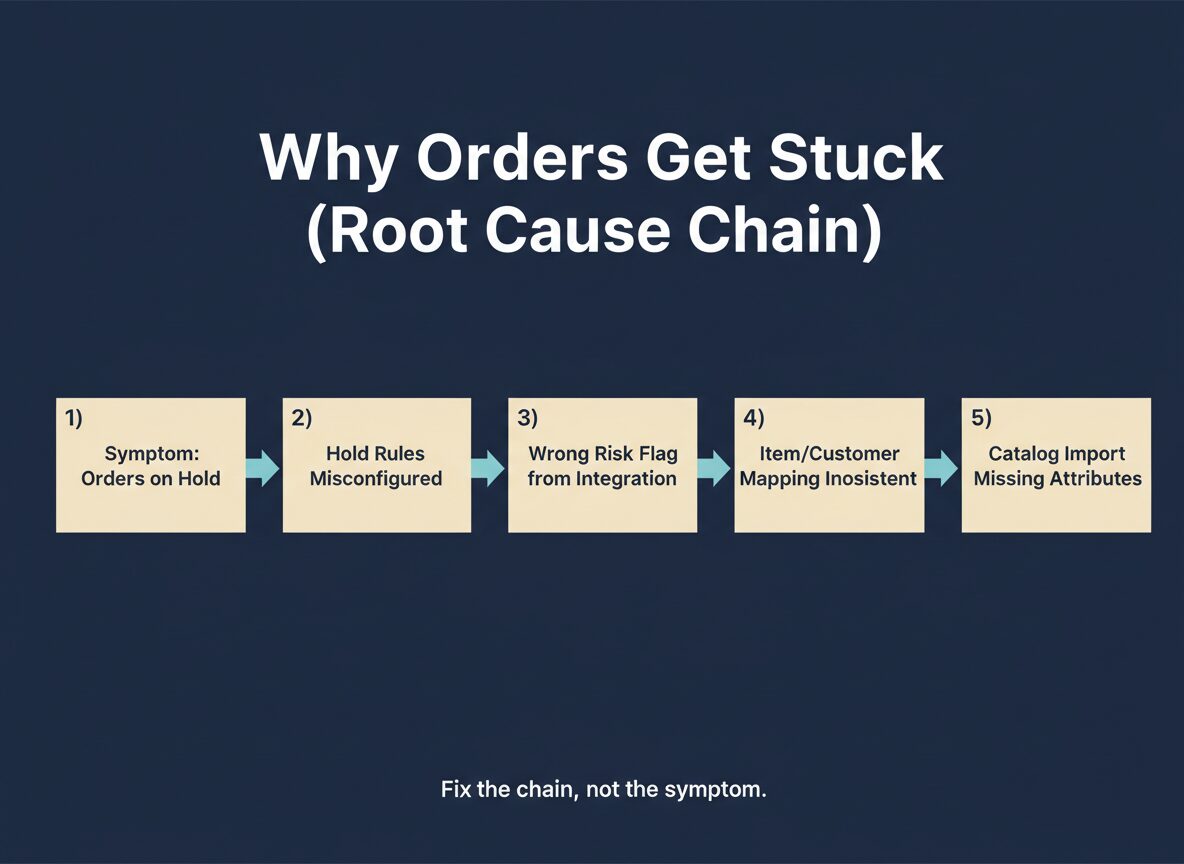
A common chain looks like this:
- orders are stuck because fraud holds are firing incorrectly
- holds are wrong because the integration sends the wrong risk flag
- the flag is wrong because mapping is inconsistent
- mapping is inconsistent because the catalog import was incomplete
No single internal person sees the whole chain. Everyone sees their piece and fights their fire.
3) Your implementation partner isn’t built for ownership after go-live
Most partners are set up for projects: scope, timeline, go-live, change requests.
After go-live you get a queue. They’ll fix what you can describe precisely. They won’t sit inside your operation and hunt root causes across ops + finance + integrations.
4) Hiring “a NetSuite admin” is a risky bet
A good admin can manage roles, saved searches, forms, and basic workflows.
One person usually can’t redesign fulfillment logic end-to-end, debug multi-system integrations, build reporting that matches your KPIs, and cover incidents when orders stop flowing.
Post Go-Live Chaos: What Breaks First (E-commerce)
Orders don’t flow
- holds applied incorrectly
- payment capture doesn’t match fulfillment timing
- partial shipments break invoicing
- backorders handled differently by channel
Inventory is wrong (or not trusted)
- locations modeled incorrectly
- item types/UoM misconfigured
- returns not landing in the right buckets
- negative inventory from timing + integrations
Shipping is slow and expensive
- carrier selection is manual
- labels created outside NetSuite with no feedback loop
- cartonization is guesswork
- rate shopping isn’t automated
Finance can’t close cleanly
- COGS timing is off
- credits/refunds don’t match returns
- tax postings inconsistent
- reconciliation depends on spreadsheets
Reporting is useless for operators
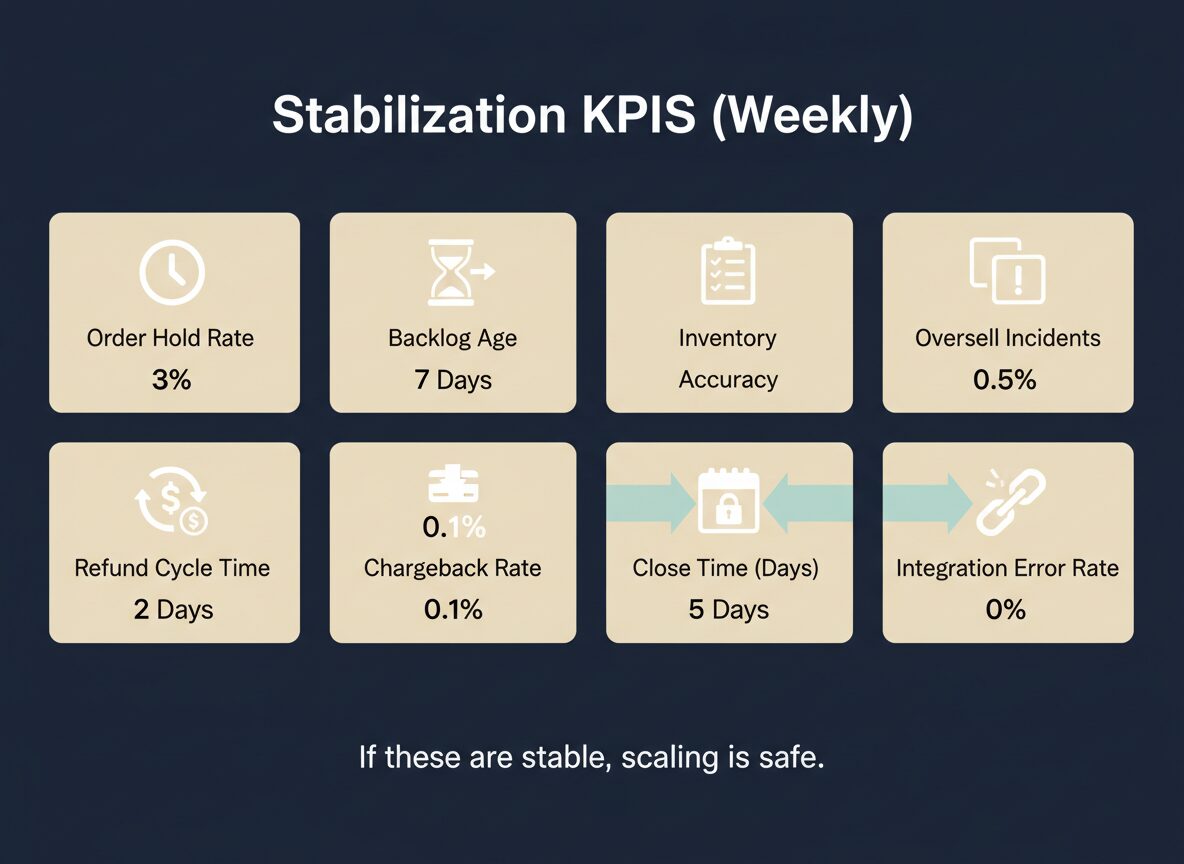
- dashboards show “ERP metrics,” not business KPIs
- saved searches built without operational context
- no single source of truth across channels

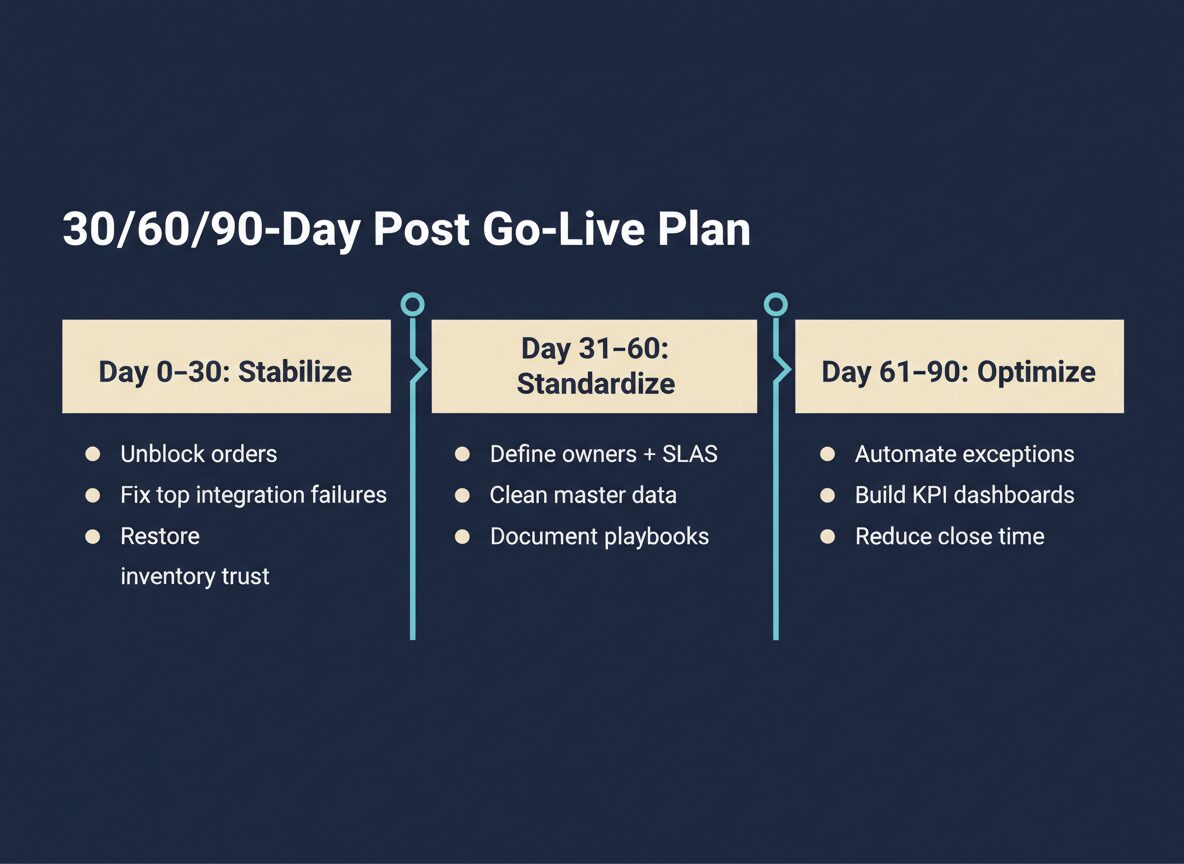
A simple post go-live plan: stabilize first 30 days, standardize next 30, then automate and optimize.
What TopSource Global Does Differently
TopSource Global operates NetSuite like production infrastructure.
We’ve spent 15+ years supporting US automotive e-commerce at scale, including teams of 50+ certified contractors, handling:
- order processing and exception management
- returns and chargebacks
- fraud protection workflows
- NetSuite operations + custom development
- integrations (platforms, carriers, tax, payment, 3PL)
- KPI dashboards and performance monitoring
Here’s how we typically engage.
1) Stabilize first (stop the bleeding)
- unblock orders
- fix the highest-impact integration failures
- restore inventory trust (or define what’s “trusted”)
- get finance back to a clean close path
- set an incident + escalation flow so issues don’t disappear in Slack
2) Map the real workflow (not the partner’s diagram)
We document how your business actually runs: what triggers holds, who approves exceptions, how returns are processed, how partial shipments are invoiced, and what “done” means for each team.
Then we align NetSuite to that reality.
3) Put guardrails in place so it doesn’t relapse
- roles/permissions that match responsibilities
- validation rules that prevent bad data
- monitoring dashboards for ops + finance
- documented playbooks for recurring issues
4) Add capacity without betting on one hire
Instead of gambling on a single admin, you get a team that can cover NetSuite operations, integration support, analytics/reporting, and back-office execution.
“Can’t We Just Train the Team More?”
Training helps. It won’t fix post-go-live chaos by itself.
Because the problem usually isn’t “people don’t know where the button is.”
It’s that the process model is wrong, the data model is inconsistent, integrations are brittle, and exception handling is undefined.
The Decision You’re Really Making
You have two paths:
- Keep pushing issues into spreadsheets and meetings, hoping the system “settles.”
- Treat NetSuite like production infrastructure and bring in operators who’ve done this before.
If NetSuite is now the core of your business, “we’ll figure it out eventually” gets expensive fast.
Want a Fast Sanity Check?
Send us:
- order volume/day
- sales channels (Shopify/Magento/Amazon/etc.)
- fulfillment model (in-house vs 3PL)
- your top 3 issues since go-live
We’ll tell you where the real bottleneck is and what to fix first.
TopSource Global — ERP automation + back-office execution for high-volume e-commerce.https://topsource.global/